
AI credits
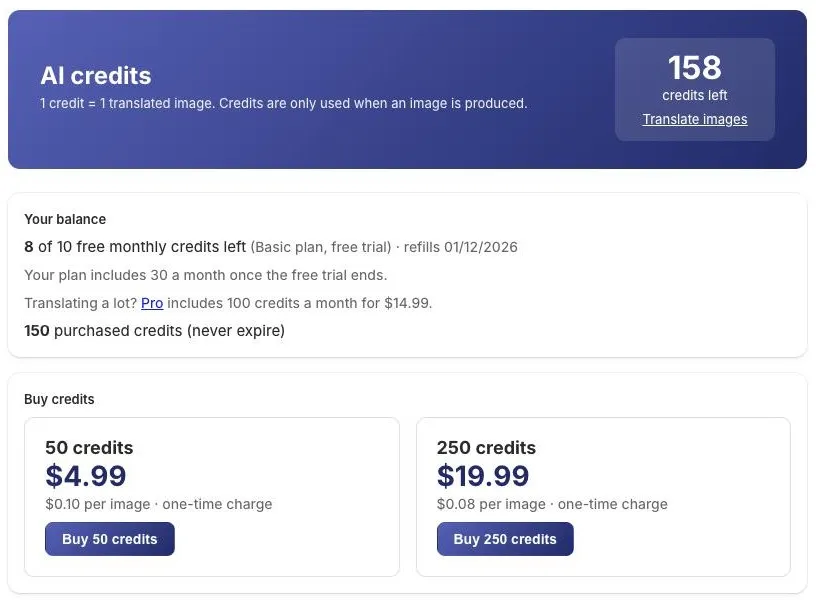
1 credit = 1 translated image (one image into one language). Check your balance on the AI Credits page in GeoGallery.
Monthly credits by plan
Section titled “Monthly credits by plan”| Plan | Monthly credits |
|---|---|
| Free | None (credit packs available) |
| Basic | 30 |
| Pro | 100 |
| During a Basic or Pro free trial | 10 |
- Monthly credits refill every 30 days. The period starts when you use your first monthly credit, and the AI Credits page shows the refill date.
- Unused monthly credits don’t carry over to the next period.
- Monthly credits are used first, then purchased credits.
Credit packs
Section titled “Credit packs”| Pack | Price | Per image |
|---|---|---|
| 50 credits | $4.99 | $0.10 |
| 250 credits | $19.99 | $0.08 |
Packs are one-time charges on your Shopify bill.
- Purchased credits never expire.
- They stay usable if you move to the Free plan.
- They’re available on every plan, including Free.
Buying a pack
Section titled “Buying a pack”- Open AI Credits.
- Under Buy credits, click Buy 50 credits or Buy 250 credits.
- Approve the charge in Shopify. You’re brought back to the AI Credits page and see “credits added to your account”.
What uses a credit
Section titled “What uses a credit”| Uses 1 credit | Free |
|---|---|
| A translated image is produced and ready for review | Images with no text (“No text found”) |
| Regenerate on a translation | Images the AI declines to edit |
| Translations that fail or are interrupted (use Try again) | |
| Approving, discarding and publishing |
Credits are only taken once an image has actually been produced.
Running out
Section titled “Running out”When you start a batch, GeoGallery checks you have enough credits for all of it, counting translations still in the queue. If you don’t, it tells you how many you need and how many you have, and you can buy a pack.
On the Free plan with no credits, the AI Translate page shows options to buy credits or see plans instead of the translation tool.
If you uninstall
Section titled “If you uninstall”When you uninstall, your translation history and any images waiting for review are deleted. Your purchased credit balance is kept so it’s there if you reinstall. Shopify asks apps to delete a store’s data 48 hours after it uninstalls; GeoGallery deletes your credit balance at that point.