
Testing your storefront
Check the app found your images
Section titled “Check the app found your images”Open GeoGallery Home. The Upload localized images step lists the codes it found (for example FR_, US_) and how many products have localized images. It checks your 50 most recently updated products, so an older product you haven’t touched in a while may not be counted here even though it works on the storefront.
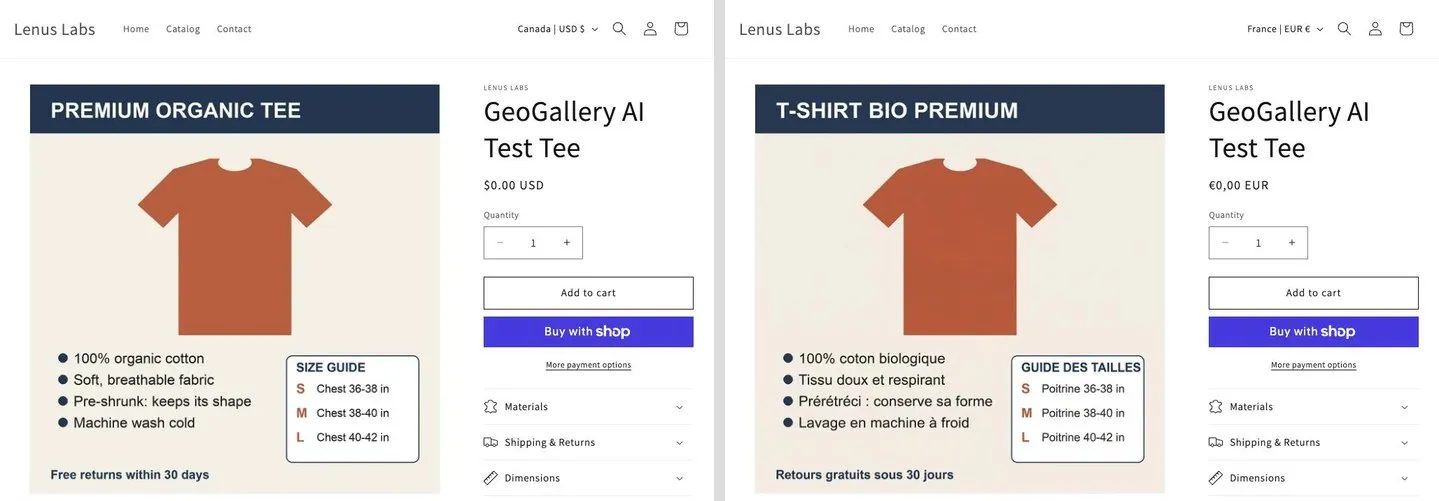
View the store as another market
Section titled “View the store as another market”Open a product page on your storefront and change the URL:
| Mode | Test URL |
|---|---|
| Language | /fr/products/your-product (use the language’s URL prefix) |
| Country | /products/your-product?country=US |
You can also use your storefront’s own country or language selector.
Things that affect what you see
Section titled “Things that affect what you see”- Your plan must be active. If your subscription ends, the block switches off and every image shows to everyone.
- Free plan: only your 3 Free products are localized. See Plans & billing.
- Browser cache: if a change doesn’t show, try a private window.
Still not right? See Troubleshooting.